
|
The plugin .ZIP file must NOT be unzipped. The files indicated below must be edited using the quick edit function of many decompression programs like 7Zip, Winzip or similar. |
Installing more than one plugin of the same type within MotionV2 requires minor changes made to the plugin's configuration files.
Below we provide you with the list of changes necessary for correct operation.
-Download the necessary plugin from https://www.xcally.com/en/app-zone.html (as an example we will use the LINE plugin);
-The files to be modified, which are contained in various subfolders of the plugin, are the following:
-
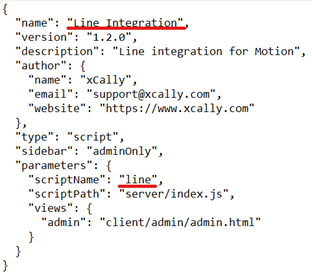
"\line-plugin\manifest.json". The file appears as in the following image where the values to be changed are shown in red. In the fields you can enter what you want, the important thing is that the value is unique compared to the other plugins;
-
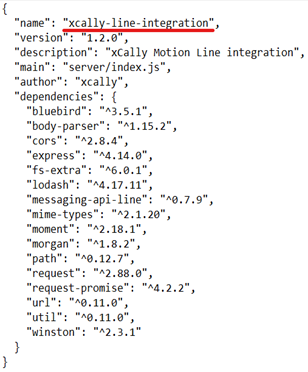
“\line-plugin\package.json”. The file appears as in the following image where the value to be changed is shown in red. In the fields you can enter what you want, the important thing is that the value is unique compared to the other plugins;
-
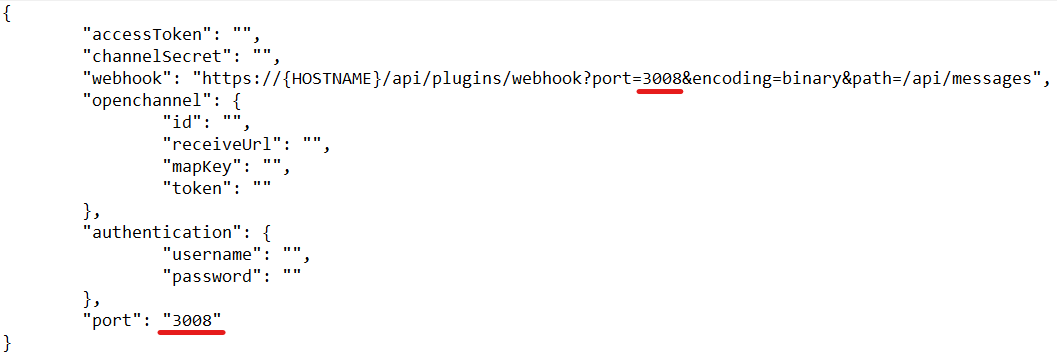
“\line-plugin\server\config\config.json”. The file appears as in the following image where the value to be changed is shown in red. As “PORT” you can insert the one you prefer. The important thing is that it is unique compared to other plugins and that it is correctly configured in the system.
-Once the files have been changed as indicated, it will be possible to upload the modified plugin to the system and continue the configuration as usual.
Comments
0 comments
Please sign in to leave a comment.